Boxify AI Assistant (Powered by GPT)
Your controllable auto-reply assistant for Facebook & Instagram.
Boxify AI does NOT reply freely — it only follows your settings:
- What you allow it to answer
- What topics you restrict
- Your escalation rules
- Your prompt instructions
You are always in control.
How to Enable GPT Customer Service in Boxify
Section titled “How to Enable GPT Customer Service in Boxify”Follow these steps to turn on the GPT Customer Service feature:
- Login Boxify -> Settings.
- Click on GPT Settings.
- Tick Enable OpenAI.
- Tick Enable GPT Customer Service
- Enter your OpenAI API key to connect Boxify with the GPT service.
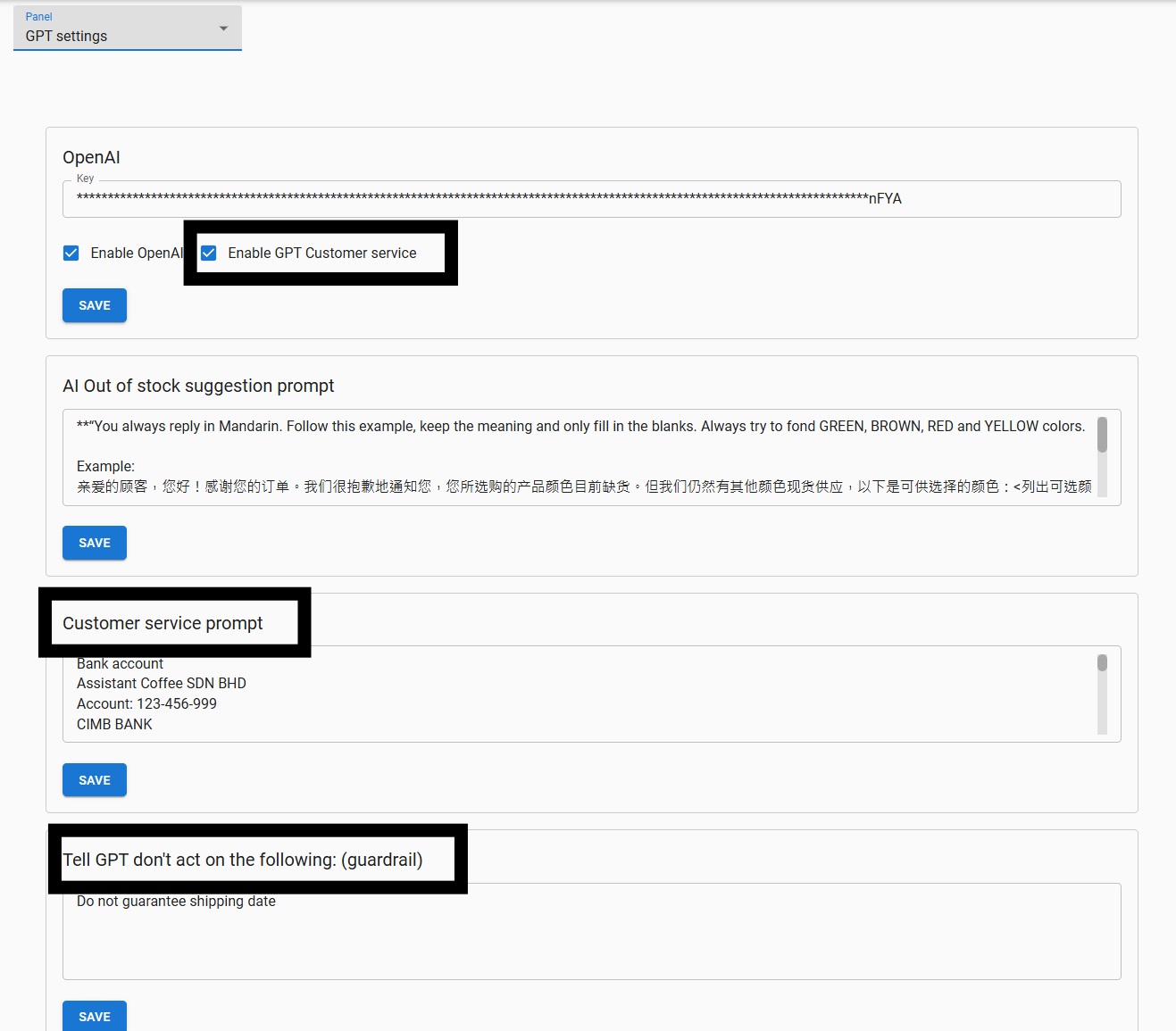
💡Note: If you don’t have an OpenAI API key yet, you can generate one via your OpenAI account–> How to find your OpenAI API key
Important: OpenAI charges based on your usage. Monitor usage carefully or set a usage limit in your OpenAI account to avoid unexpected charges.
Why Boxify GPT Is Safe
Section titled “Why Boxify GPT Is Safe”Many merchants fear “AI will answer wrongly”.
In Boxify, GPT will only respond based on your instructions and guardrails. If AI replies incorrectly, it means the instruction needs adjustment — not that AI is unsafe.
Boxify’s design gives you:
✔ Complete control over what AI can say ✔ Escalation to human when needed ✔ Guardrails to prevent risky replies ✔ Playground testing before going live
The 4 Controls You Manage
Section titled “The 4 Controls You Manage”You can control Boxify AI with 4 simple inputs:
1️⃣ AI Out of Stock Suggestion Prompt 2️⃣ Customer Service Prompt 3️⃣ Tell GPT Don’t Act On The Following (Guardrails) 4️⃣ Test Customer Service GPT Playground
1️⃣ AI Out of Stock Suggestion Prompt
Section titled “1️⃣ AI Out of Stock Suggestion Prompt”Purpose: How AI tells customers when an item is out of stock, and how it may suggest alternatives.
**Safe Template:*If item is out of stock, reply politely:“This item is currently out of stock. Would you like to see similar items?”**Only suggest alternative products if stock is confirmed available.*Do not guess or assume availability.
2️⃣ Customer Service Prompt
Section titled “2️⃣ Customer Service Prompt”This is your AI assistant’s personality & response rules — like training an employee. You may include key information like:
- Your business name (e.g., ABC Live Shopping)
- Products you sell (e.g., handbags made in Malaysia)
- Shipping or customer support details
- Facebook Live schedule or event details
- Bank account or payment instructions
Recommended Starter (Safe Mode):
You are the customer service assistant for [Shop Name]. Reply politely and professionally. Keep replies within 3 short sentences.
Answer questions about: – Price – Stock – Shipping
If customer asks about refund, complaint, or payment dispute, escalate to human agent. Do not guarantee delivery dates. Do not make up information. If unsure, say: “I will check with our team and get back to you shortly.”
💡If you want to use this prompt, replace [Shop Name] with your business name.
3️⃣ Guardrails — “Don’t Act On The Following”
Section titled “3️⃣ Guardrails — “Don’t Act On The Following””This is your safety lock. Anything written here, GPT will not act on. Recommended guardrail topics:
Do not handle refund or return requests. Escalate all payment disputes to human support. Do not approve or promise any discount. Do not guarantee delivery dates or arrival time. Do not provide any sensitive customer information.
⚠️When these appear in customer queries, AI should escalate to human support.
4️⃣ Test in Customer Service GPT Playground
Section titled “4️⃣ Test in Customer Service GPT Playground”Before going live, always use the Playground to test.
🎯 Recommended tests:
- Ask about price
- Ask about stock
- Ask about shipping
- Ask about refund
- Ask something unrelated
Expectations:
✔ Price answered correctly ✔ Refund question escalated to human ✔ No promises that you don’t want to commit ✔ Short, controlled replies
If any reply feels unsafe → adjust your prompt + guardrails and test again.
Best Practice
Section titled “Best Practice”Start with a simple instruction. Add complexity only after you understand how AI replies behave. Focus first on: ✔ Tone ✔ Allowed topics ✔ Escalation rules ✔ Guardrails
You can refine any time.
🚀 Final Reminder
Section titled “🚀 Final Reminder”Boxify AI is here to save you time, not replace you.
You control:
- What it says
- What it avoids
- When it escalates
- When it replies automatically
Set it up, test it, and enable with confidence.
Example Customer Service Prompt
Business Info:Assistant Coffee SDN BHDAccount: 123-456-999CIMB BANKWe sell women’s fashion and accessories through Facebook Live.
Chatbot Name: CoffeeBot
---
Customer Service Policy:- Friendly, 24/7 support via Facebook Chat- Follow-up after orders to ensure satisfaction- Multichannel support available (email, WhatsApp)
Example Reply:Hi [Customer Name],I'm CoffeeBot from Assistant Coffee.We’re available 24/7 — message us anytime via Facebook or email us at support@example.com.Let me know how I can assist you with your order.— CoffeeBot
---
Out-of-Policy Request Handling:- Policies are firm, but we try to help where possible- GPT may offer store credit, discounts, or escalate to a human
Example Reply:Hi [Customer Name],I understand your concern. While we can’t [request], how about a store credit or a special discount for your next order?I’ve passed this to our team — you’ll hear back by [date].Thanks for your patience.— CoffeeBot